How to Extract Specific Data from Scanned Invoices Using Built-In OS Vision Tools
How to Extract Specific Data from Scanned Invoices Using Built-In OS Vision Tools
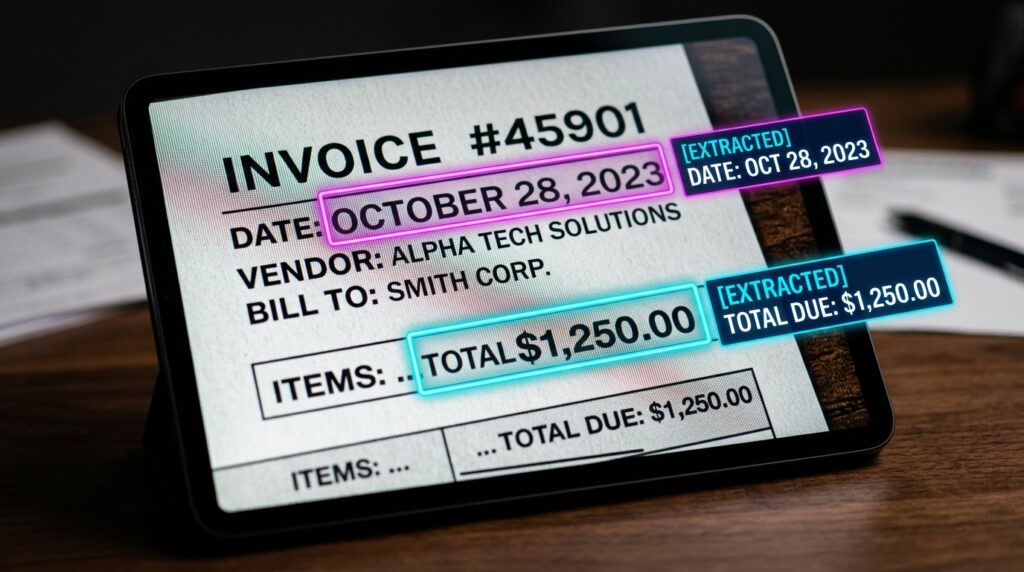
Especially when working with huge amounts of financial documents in PDF or image format, manually processing scanned invoices is a chore that is both slow and prone to errors. Traditional OCR technologies usually struggle with uneven layouts and low-quality scans, which makes it difficult for businesses to extract particular elements such as invoice number, date, vendor name, total amount, and tax information. However, businesses regularly need to extract these fields. Built-in vision capabilities are now included in modern operating systems. These capabilities allow for the interpretation of pictures, recognition of structured language, and extraction of useful data without the need for complicated software from a third organization. Through the use of these operating system-level vision technologies, it is feasible to automate the extraction of invoice data directly on your device while preserving speed, accuracy, and privacy. Users are able to convert unstructured scanned documents into structured data that can be read by machines by using an artificial intelligence vision model that is included into the system. Accounting procedures, expenditure tracking, and document processing at the corporate level are all areas in which this technique provides very valuable results. Gaining an understanding of how to make efficient use of these technologies may considerably increase financial automation and minimise the amount of work that is done manually.
Knowing How Operating System Vision Tools Process Documents That Have Been Scanned
Software vision technologies that are built into operating systems depend on optical character recognition in conjunction with machine learning models that comprehend the structure of documents. Rather than only reading the text, they examine the layout patterns, tables, and spatial connections that exist between the pieces that are present on a page. The ability to discriminate between headers, line items, totals, and metadata fields inside an invoice is available to them as a result of this. The first step in the process of processing a scanned document is for the system to improve picture quality by eliminating noise, correcting skew, and enhancing contrast from the page. The next step is for it to recognise text areas and transform them into digital material that can be edited. Advanced models go one step further by reading context, such as recognising that a figure close to “Total” reflects the total amount that is owed to the customer. Because of this structured knowledge, contemporary vision technologies are far more powerful than classic optical character recognition (OCR) systems.
Getting Scannable Invoices Ready for Extraction of Accurate Information
In order to achieve accurate extraction, the quality of the input scans is of the utmost importance. Scans that are unclear or skewed give outcomes that are much inferior to those that are produced by clear, high-resolution photographs. It is important that invoices be correctly aligned, cropped, and stored in formats that are supported, such as PDF or PNG, before they are actually processed. In addition, recognition performance is improved by illumination that is consistent and background noise that is limited. If many invoices are bundled into a single file, it is best to separate them in advance so that the data extraction process may be more efficient. The chance of misreading characters or missing fields is reduced when inputs are well-prepared, despite the fact that contemporary vision technologies are considered to be robust. By doing this phase of preparation, the artificial intelligence system will be able to concentrate on analysing the text rather than fixing any visual distortions. Preprocessing must be done correctly in order to provide dependable outcomes when used at a large scale.
The Practice of Using Vision-Based Recognition to Extract Important Invoice Fields
Once an invoice that has been scanned has been analysed, the system is able to recognise and extract certain data based on its awareness of the existing context. Invoice numbers, issuance dates, vendor names, line items, subtotal, tax, and total amount are examples of data that are often extracted. In order to establish which values correlate to which fields, vision tools do an analysis of spatial placement and labelling patterns. Numbers that are aligned with the “Invoice Date” field, for instance, are automatically classified as date values. Because of this, there is no longer a need for manually selecting fields or using template-based processing. In order to facilitate future processing, the data that has been collected may be organised into tables or JSON forms. This organised output is especially helpful for accounting systems and databases that include financial information. The method is very scalable and efficient due to the fact that it is able to automatically analyse invoice layouts.
Automating Processes Through the Use of Built-In System Features
Native automation features that connect visual processing with system operations are being more integrated into modern operating systems. Through the use of these tools, users are able to extract invoice data straight from files without having to launch any other apps. Depending on the system, automation may be activated via the use of context menus, rapid actions, or processes that are script-based. After the system has been started, it will process the document and produce structured data that may be copied, saved, or exported. By reducing friction and increasing efficiency in repeated processes, this seamless connection offers a significant benefit. As a result of the fact that data processing is carried out locally on the device, built-in automation also guarantees improved security. Because of this, it is an excellent choice for managing sensitive financial documents without having to depend on cloud processing services.
Enhancing Accuracy Through the Validation of Contextual Statistics
It is essential to validate data in order to guarantee its integrity, despite the fact that vision tools are quite accurate. Values that have been extracted need to be double-checked to ensure that they are consistent, particularly in the realm of finance, where totals and tax computations are concerned. Anomalies, such as incorrect amounts or misread letters, may be identified with the assistance of contextual validation. If, for instance, the line items do not correspond to the final total, the system has the capability to report the disparity for further examination. Some processes additionally incorporate rule-based checks to guarantee that the data that is extracted is in accordance with the formats that are anticipated. Because of this extra layer of verification, the possibility of mistakes occurring in financial records is decreased. The combination of artificial intelligence extraction and validation logic guarantees both speed and reliability in the processing of documents.
Managing Complicated Invoice Layouts and Variations, Including
Invoices may be found in a wide variety of forms, which might provide difficulties for information extraction systems that are automated. The usage of tables is present in certain texts, while others depend on free-form layouts that have placement that is inconsistent. These variances are taken into account by advanced vision models, which are intended to manage them by putting more of an emphasis on semantic comprehension than set templates. The need for manual setup is eliminated, and they are able to accommodate a variety of vendor formats. On the other hand, bills that are very complicated or poorly organised could still need to be partially reviewed manually. Over time, these restrictions may be further reduced with the aid of continuous improvements in model training. When it comes to extending invoice processing across numerous suppliers and sectors, successfully managing layout variability is a key component.
The Integration of Data That Has Been Extracted Into Financial Systems
After the data from the invoices has been retrieved, it may be incorporated into accounting software, spreadsheets, or enterprise resource planning systems via integration. The process of transferring data from one system to another is simplified by structured formats such as CSV and JSON. The need for manual input of information may be eliminated by using automation scripts to immediately push extracted data into financial systems. This connection makes it possible to keep track of expenses in real time and to generate financial reports. In addition to this, it enhances audit readiness by ensuring that records are consistent and can be traced. Invoices in their raw form may be transformed into useful financial information via seamless data integration. After document scanning and the use of structured financial data, this phase brings the automation pipeline to a successful conclusion.
Increasing the Capacity of Invoice Processing for Business Workcycles
Scalability becomes an essential component for companies that deal with a significant number of invoices that are sent out. By allowing several documents to be handled concurrently, batch processing dramatically cuts down on the amount of time needed to complete the procedure. In order to automatically process new invoices and monitor folders, automation pipelines may be built to do these things. Because of this, a continuous process is produced, which needs only minimum interaction from humans. The optimisation of performance and the management of resources become more essential issues as the volume grows. Even when faced with a significant amount of work, scalable solutions guarantee that both accuracy and speed will stay unchanged. Through the use of this strategy, the administration of invoices is transformed into a completely automated financial process over time.